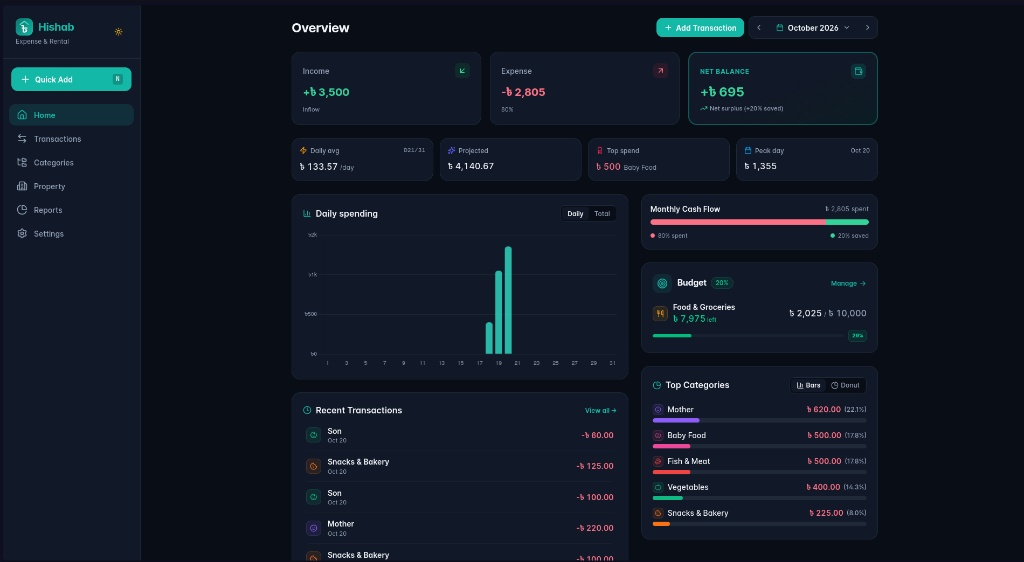
Most mainstream personal finance apps are designed around a full-ledger model: you declare every bank account, log physical pocket cash, reconcile mobile wallets, and record internal transfers whenever you withdraw cash from an ATM. For many people, that depth is exactly what they want. For me, the friction was so high that after a few weeks I stopped logging expenses entirely.
I built Hishab to solve my own day-to-day problems. I did not care about reconciling balances across five banking portals. I needed a frictionless cashflow monitor: record daily income when it arrives, log expenses the moment they occur, keep track of multi-unit rental leases, and split shared apartment utility bills fairly across tenants.
The system runs on a shared Linux container with around 250MB RAM (0.25 vCPU) with zero cloud hosting bills. It started as a local-first Progressive Web App (PWA) and evolved into a dedicated Android application backed by a Laravel 13 API. Here is how the system is designed, the domain problems it tackles, and the lessons learned along the way.
1. The Problem With Commercial SaaS Apps
Popular budgeting apps like YNAB or Monarch charge $10 to $20 per month ($120 to $240 per year) and are built around a full account-reconciliation model. For my workflow, that came with friction I never needed:
- Enterprise accounting overhead: Declaring every bank account, reconciling mobile wallets, and recording internal transfers every time you withdraw ATM cash adds up to real cognitive overhead. For me, that friction broke the logging habit within weeks.
- Locked feature roadmaps: If you need a specialized feature (such as splitting complex utility bills across rental units, custom sub-category rollups, or local currency formatting), niche personal workflows rarely make it onto commercial product roadmaps. You ship what they prioritize, not what you need.
- Perpetual subscription costs: Most commercial apps have no one-time purchase option. You pay every month indefinitely or lose access to your own financial history. YNAB costs $109 per year; Monarch is $100 per year. A self-hosted app on a free-tier server costs zero in perpetuity after the initial build time.
- Privacy and lock-in: Your complete daily financial habits, income streams, and personal expenses reside on third-party cloud servers. Cancelling the subscription often means losing access to historical data.
I built Hishab to take back complete ownership. When you build your own system, you have unlimited freedom to add, tweak, and extend any feature whenever your needs evolve in a single afternoon without paying a single dime or waiting for a product update.
2. The Single Cashflow Model & Deep Category Hierarchies
The core philosophy of Hishab is simple: eliminate multi-account balancing completely. In everyday life, tracking where every individual bank coin sits creates unnecessary mental clutter. What actually matters is knowing your true burn rate, understanding where money flows each month, and keeping daily logging under three quick taps.
Arbitrary Category Depth (3, 4, 5+ Levels)
One major reason I abandoned existing personal finance applications was their superficial category systems. Almost every mainstream budgeting app restricts users to flat lists or at most two levels (e.g. Food and Groceries). Real life is far more layered:
- You need deep, nested hierarchies like
Personal > Family > Son > Health > MedicineorFood & Groceries > Groceries > Snacks & Bakery. - When logging daily items, you need the precision of deep subcategories without creating fragmented, disconnected reports.
- In Hishab, the category tree supports arbitrary nesting depth. Child expenses automatically roll up to their respective parents. In high-level reports, you see aggregated monthly totals, but clicking into any category lets you drill down across multiple levels with interactive donut charts and breakdown percentages.
Pragmatic Constant Budgeting: Tracking Real Spikes (Eid, Puja, Festivals)
Certain budgeting philosophies (YNAB being the most notable) encourage you to budget from a zero base each month. For me, that meant re-entering the same numbers every 30 days with minor adjustments, which quickly felt like administrative overhead rather than insight.
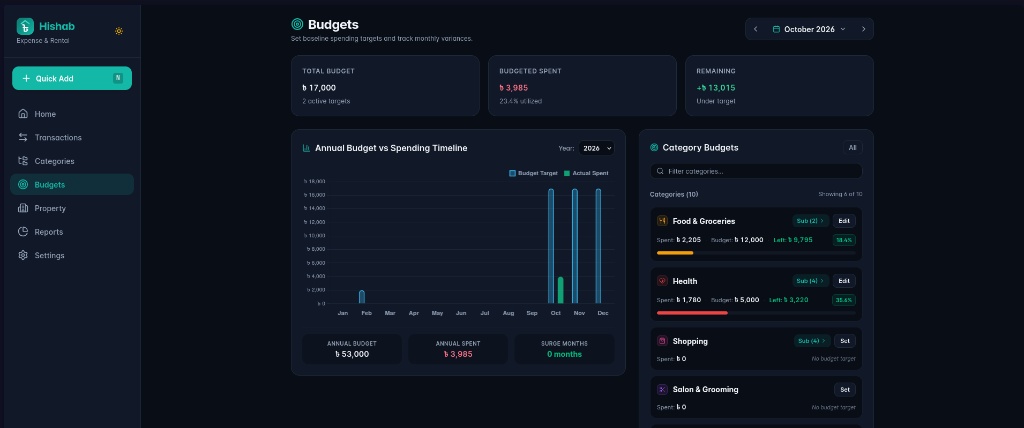
My personal experience showed that true financial clarity comes from a constant baseline budget:
- For around 8 months of the year, regular household spending remains relatively steady. Setting a solid baseline gives you a predictable target.
- During festive seasons (such as Eid, Durga Puja, weddings, or family emergencies) spanning 2 to 4 months, spending inevitably climbs above baseline.
- Instead of constantly shifting your budget targets each month to hide the variance, a steady baseline immediately highlights the exact surge: "My baseline for family gifts is ৳ 5,000, but this festival month it reached ৳ 14,000 (+180% surge)."
- This contrast makes tracking seasonal spikes effortless, actionable, and mathematically grounded.
Bottom-Up Budget Rollup & Dynamic Upward Auto-Adjustment
Once you support arbitrary category depth, hierarchical budgeting introduces a classic architectural dilemma: what happens when child categories are assigned budgets that exceed their parent's direct target?
Most apps that support budgets at all treat the budget hierarchy as flat. When you add arbitrary depth, parent-child budget conflicts have no obvious resolution. A naive approach would throw validation errors or require manual recalculations up every ancestor. In daily practice, that friction makes hierarchical budgeting unusable.
In Hishab, the budget engine resolves this through an in-memory dynamic upward cascade:
- Automatic upward expansion: When you set a budget on a child category, its ancestors automatically accommodate the child. If the sum of child targets exceeds the parent's direct budget, the parent dynamically expands up to the root level. No validation roadblocks or error banners.
- Unallocated buffer calculation: If a parent category has a direct budget larger than the sum of its children, the difference is tracked as an
unallocated_buffer(e.g. ৳ 3,000 remaining buffer for Groceries). This gives you immediate visibility into unassigned spending headroom. - In-memory recursive rollup: The budget resolution runs in-memory using the pre-computed category tree. Leaf budgets bubble up cleanly, preventing redundant database roundtrips regardless of category nesting depth.
// Dynamic bottom-up budget resolution in BudgetService
private function resolveCategoryBudget(string $catId, CategoryTree $tree, array $directBudgets, array &$resolved): array
{
    $subtreeBudget = 0;
    foreach ($tree->childrenIds($catId) as $childId) {
        $child = $this->resolveCategoryBudget($childId, $tree, $directBudgets, $resolved);
        $subtreeBudget += $child['effective_budget'] ?? 0;
    }

    $direct = $directBudgets[$catId] ?? null;

    if ($direct !== null) {
        // If children exceed parent direct target, parent expands dynamically
        if ($subtreeBudget > $direct) {
            $effective = $subtreeBudget;
            $isRolledUp = true;
        } else {
            $effective = $direct;
            $unallocated = $direct - $subtreeBudget;
        }
    } elseif ($subtreeBudget > 0) {
        $effective = $subtreeBudget;
        $isRolledUp = true;
    }

    return $resolved[$catId] = [
        'effective_budget' => $effective,
        'is_rolled_up' => $isRolledUp,
        'unallocated_buffer' => $unallocated,
    ];
}
Strict Historical Scoping: Past Month Isolation vs Future Cascading
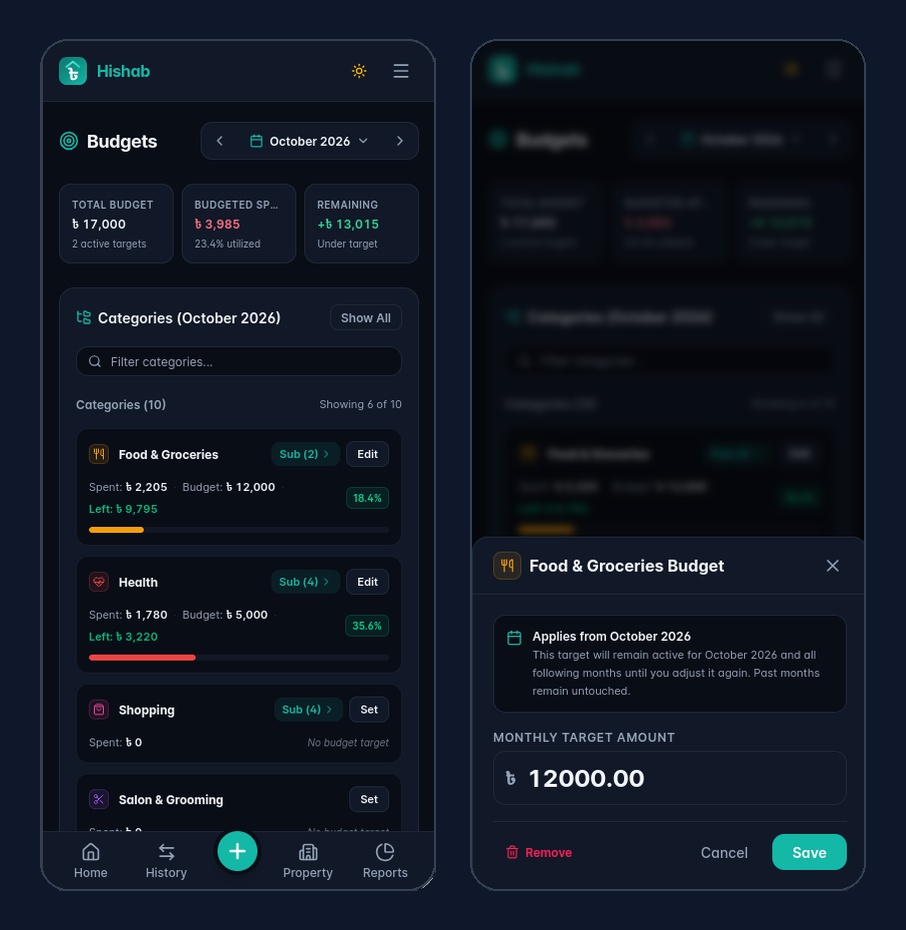
A subtle but critical bug in many budgeting tools is time leakage. If you navigate back to a past month (for example, February 2026) to log or adjust a historical target, should that target overwrite your current or future months?
If past edits cascade forward, they silently break present-day financial calculations. If budgets are strictly locked to individual months, you lose the convenience of setting a baseline that automatically carries forward.
We solved this by establishing strict historical boundary scoping:
- Past month isolation: When an adjustment is saved for any past month (
month < currentMonth), the service automatically sets a boundary on the following month restoring the prior baseline. The historical edit applies strictly to that specific past month and never bleeds forward. - Current and future cascading: When setting a budget in the present or future, it naturally cascades into following months until explicitly adjusted again.
- Contextual UI awareness: The modal dynamically clarifies the exact blast radius of the target: "Applies to February 2026 only" for historical edits versus "Applies from October 2026" for ongoing targets.
3. The Rental Challenge: Bill Splits and FIFO Reconciliation
Managing residential rental units brings two specific operational headaches: dividing shared utility bills and managing partial rent payments without arguments.
Deterministic Utility Bill Splits
When an apartment building receives a combined utility invoice (gas, water, common area electricity, or waste collection) that must be split across several units, simple division often produces fractional remainders. Rounding numbers arbitrarily means either the landlord absorbs lost money or tenant statements fail to sum to the invoice total.
The bill splitting service uses integer arithmetic to calculate the base share, finds the remainder, and allocates the extra poishas deterministically to units sorted alphabetically by name. The math is completely reproducible and accounts for every unit share down to the penny:
public function split(int $totalAmount, array $unitIds): array
{
    $count = count($unitIds);
    if ($count === 0) {
        return [];
    }

    $baseShare = intdiv($totalAmount, $count);
    $remainder = $totalAmount % $count;

    // Sort unit IDs to keep remainder allocation consistent
    sort($unitIds);

    $shares = [];
    foreach ($unitIds as $index => $id) {
        $extra = ($index < $remainder) ? 1 : 0;
        $shares[$id] = $baseShare + $extra;
    }

    return $shares;
}
FIFO Lease Balance Reconciliation
Tenants often pay rent in installments. When someone pays a partial amount against an outstanding balance composed of both rent and shared utility charges, how should that money be applied?
The balance allocation service resolves charges in strict chronological order (FIFO). Within any given month, it prioritizes actual rent obligations before shared utility bills. This ensures that rent dues are settled first, preventing tenant confusion and making receipt generation straightforward.
4. Architectural Efficiency: Running on 256MB RAM & 100MB Disk
Modern web development often assumes abundant server memory and expensive cloud clusters. Running production Laravel 13 inside a shared Linux container with a strict 256MB RAM cap and 100MB disk limit required intentional architectural discipline:
- SQLite as a Zero-Daemon Database: A traditional MySQL or PostgreSQL server consumes 120MB to 200MB of resident memory just to sit idle waiting for connections. Hishab uses SQLite instead. Because SQLite is an in-process file database, its standby idle memory is exactly 0 MB. For a single-user system accessed across multiple devices, SQLite delivers sub-millisecond query performance with zero connection pool overhead.
- On-Demand PHP Execution: The backend runs under PHP-FPM with fully cached bootstrap metadata (config, routes, and views). When an API request arrives, PHP processes the request and immediately releases memory back to the host system with no persistent process overhead between requests.
- Client-Side Rendering (SPA) Eliminates Server Load: Serving server-side rendered (SSR) templates or Node.js SSR processes places heavy CPU and memory load on the host. Instead, the compiled Vue 3 Single Page Application (PWA) is served directly as static files. All chart calculations, data sorting, and category rollups execute entirely on the client device. The server only transmits compact JSON payloads.
- Sub-Megabyte Production Bundle: The entire compiled frontend (Vue 3, Vite, Chart.js, Tailwind, and Workbox Service Worker) totals around 1 MB uncompressed and approximately 300 KB over the wire with gzip. Combined with automated gzip compressed daily database backups, the entire application fits comfortably within the 100MB disk quota with room to spare.
- Deep Health Monitoring: A dedicated deep health check endpoint constantly verifies database connectivity, storage write permissions, free disk space, and backup freshness to ensure rock-solid production stability.
5. The Mobile Journey: From PWA to Native Android
Because expense logging happens on the go, mobile experience was central to the project.
Offline-First with IndexedDB and Web Locks
The client uses an IndexedDB outbox. When an expense is recorded offline, the client generates a unique UUID, saves the record locally, and provides immediate optimistic UI feedback. Once network access returns, a background flusher sends idempotent PUT requests to synchronize records with the server.
To prevent race conditions when the app is open in multiple browser tabs, synchronization uses the browser Web Locks API where available, with an in-memory mutex fallback for older environments. Only one tab flushes the offline queue at a time.
Why TWA Fell Short
My first step toward a standalone mobile app was using a Trusted Web Activity (TWA) wrapper. In practice, TWA presented several friction points:
- It relies entirely on the user having an updated browser installed with Custom Tabs support.
- Digital asset verification over slow mobile data connections occasionally failed, unexpectedly revealing browser URL bars.
- There was no clean way to dynamically synchronize Android status bar and navigation bar colors when toggling themes inside the web view.
The Native Android Wrapper
To achieve a truly native feel, I built a dedicated native Android wrapper using an optimized WebView and a bidirectional JavaScript interface:
public class AndroidThemeBridge {
    @JavascriptInterface
    public void onThemeChangedWithColor(boolean isDark, String hexColor) {
        runOnUiThread(() -> applyTheme(isDark, hexColor));
    }

    @JavascriptInterface
    public void setScrollState(boolean isScrolled) {
        isPageScrolledDown = isScrolled;
    }
}
This gave complete control over the native shell:
- Dynamic system bar tinting: Toggling dark mode in the web app communicates directly with Android window insets, seamlessly recoloring the system status and navigation bars.
- Hardware back button integration: Pressing the device back button navigates internal web history instead of closing the application.
- Native pull-to-refresh: A native refresh gesture coordinates with the web scroll container, activating only when pulled from the very top of the page.
- Standalone distribution: Packing into a native APK gives a fast, dependable mobile app with zero browser chrome interference.
6. Mobile UI Polish: Handling Dense Data
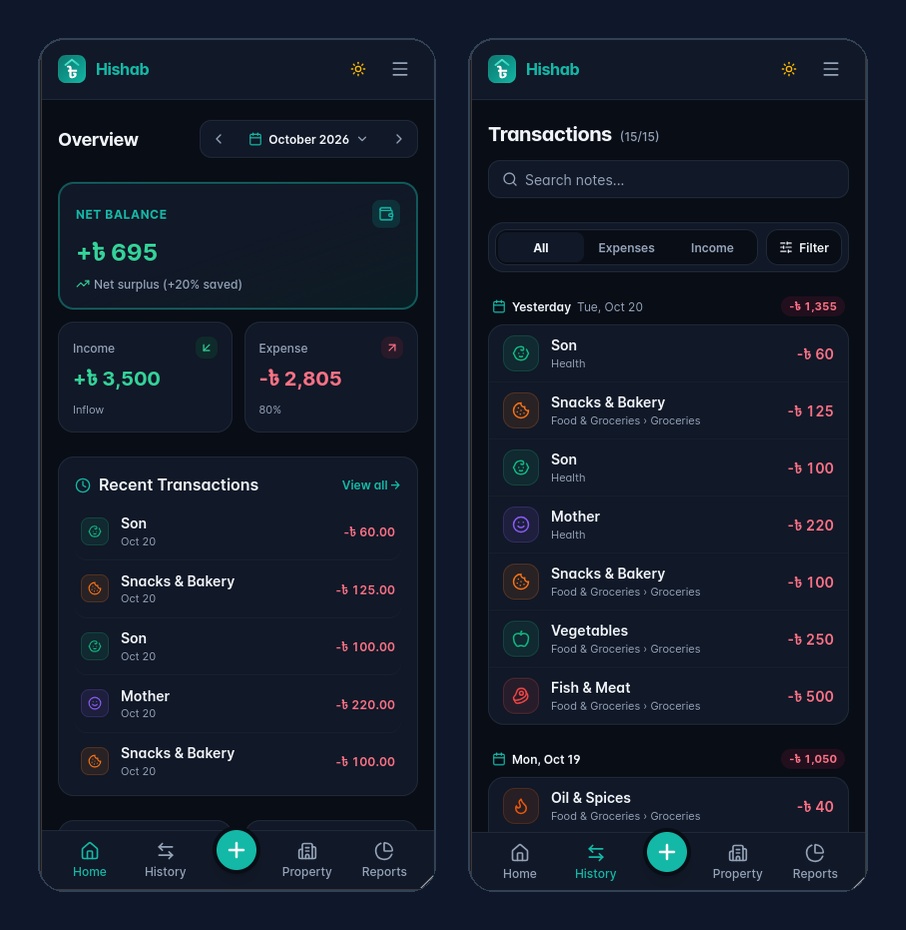
Designing financial dashboards for small screens involves balancing information density with readability. On desktop screens, displaying multi-column financial charts and detailed status badges is easy. On a narrow phone display, overcrowding creates visual noise and causes awkward text truncation.
We solved this through several practical adjustments:
- Typography over chunky badges: Replacing heavy, bordered badge pills with clean typographic subtitles and subtle bullet separators gives dense lists breathing room while keeping category names fully visible.
- Responsive chart labels: On smaller viewports, monthly trend charts switch to compact month abbreviations or single-letter labels so 12 months of spending history fit comfortably without horizontal scrolling.
- Content-aligned metadata: Aligning secondary details directly under the item title preserves natural reading hierarchy and makes touch targets easier to tap on mobile.
7. Takeaways
Building Hishab reinforced a few core lessons for practical software development:
- Solve your own problem first: Commercial software often suffers from feature bloat. Building a focused tool tailored to your exact daily routine creates software you will actually use long term.
- Resource limits foster better engineering: Operating within a 256MB memory cap forces you to understand where memory is spent, cut unnecessary dependencies, and build lean, reliable software.
- Choose the pragmatic mobile bridge: When a PWA meets browser limitations on mobile hardware, a lightweight native WebView wrapper offers the best balance of web development speed and native device integration.
Hishab continues to handle my personal expenses and rental property management every day. If you are building local-first applications or optimizing SaaS architectures for lean infrastructure, focusing on simplicity and solid domain boundaries will always pay dividends.
Work with me
Need help with your Laravel or SaaS architecture?
I build clean, high-performance web applications, offline-first architectures, and production-ready Laravel backends designed to scale without bloated cloud bills.